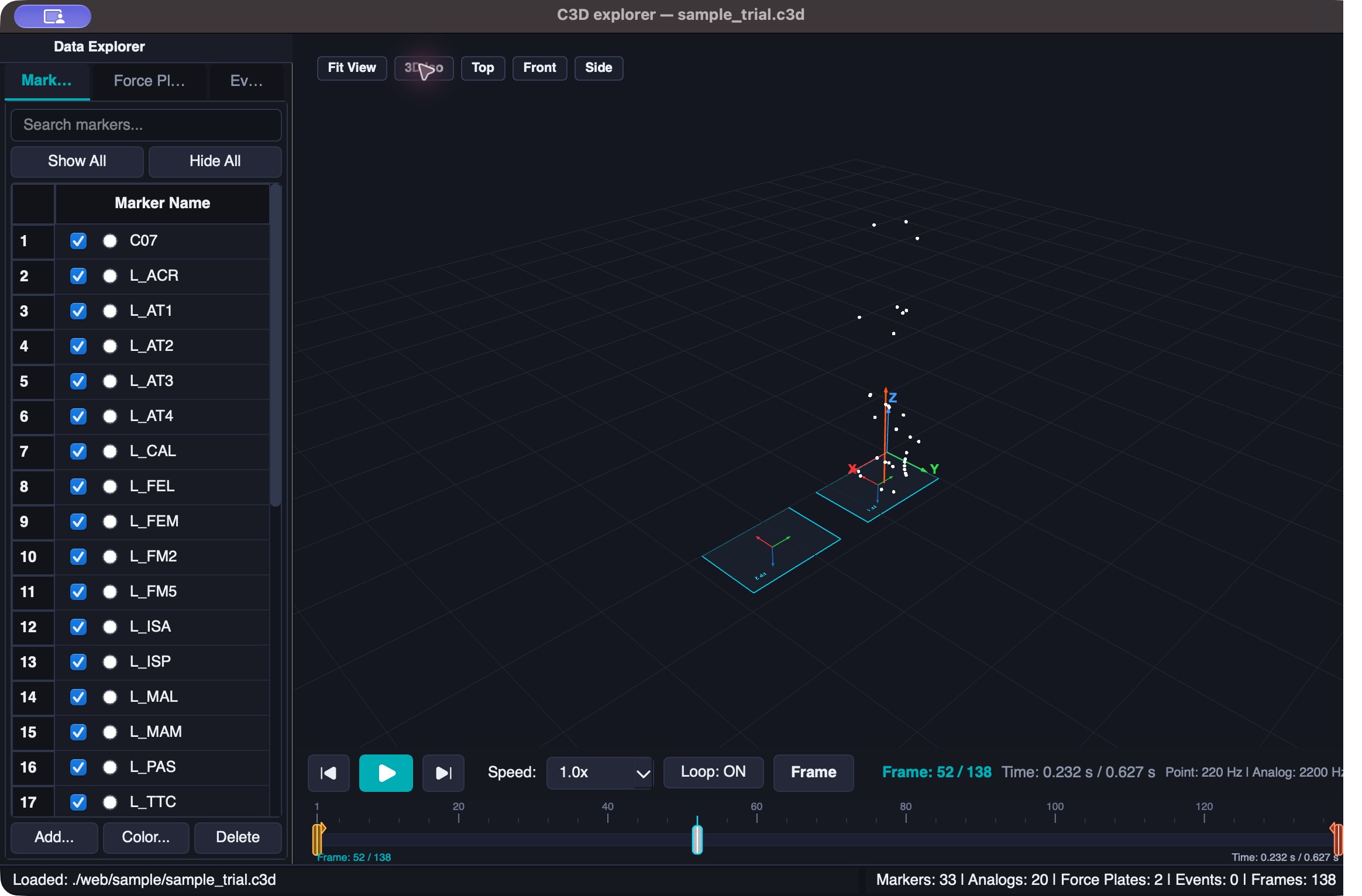
See the measurement in context.
Inspect the marker set, navigate the laboratory view, and scrub through the trial frame by frame.
Open-source biomechanics software for the questions that move research forward. Visualize, measure, and refine your motion capture data with C3D Explorer.
Download C3D Explorer ↓See it in action ↗Meet the first tool in the Biomech-Lab collection.
C3D Explorer is a lightweight, cross-platform biomechanics desktop workstation for researchers, clinicians, and movement scientists. It brings real-time 3D optical marker visualization, synchronized analog and force plate plots, interactive gait event detection, marker trajectory filtering, and direct .c3d editing into a modern, hardware-accelerated environment—without requiring expensive proprietary motion capture software.
Get C3D Explorer ↓Apple silicon (M1 or newer) · macOS 13+
Experimental build · approximately 78 MB
Animate optical markers with customizable radii, colors, and individual selection. View force plate geometry, local coordinate systems, and dynamic ground reaction force vectors from the center of pressure. Switch between isometric, top, front, side, and fit-to-data views.
Scrub frame by frame in frames or seconds. Inspect color-coded right, left, and general events. Add, modify, or delete foot strikes, foot offs, and custom annotations with frame/time conversion and standard C3D event export.
Plot marker X, Y, Z and magnitude, force and moment components, COP, EMG, and other analog channels on a shared timeline. PyQtGraph renders raw samples without downsampling, with a synchronized playhead and hover inspection. Export CSV or high-resolution PNG figures.
Pick markers directly in 3D, with Alt/Option-click for multi-selection. Measure two-marker distances and three-marker angles with 3D overlays and synchronized curves. Inspect mean, SD, minimum, and maximum within a region of interest, or create midpoint marker trajectories.
Apply zero-phase Butterworth low-pass filters to marker trajectories with adjustable cutoff and order. Filter analog signals, compute RMS envelopes, and rename or delete channels. Undo and redo marker filtering, renames, additions, and edits.
Read and write C3D files with ezc3d, or drag a trial into the app. Save modified coordinates, events, and filtered channels into standard C3D files. Export marker and analog data to CSV and 3D surfaces to STL. Dedicated OpenSim workflow exports remain on the roadmap.
Choose Biomech Dark, Clinical Light, Nordic Midnight, Graphite Slate, or Cyber Amber. Designed for macOS, Windows, and Linux. The downloadable build currently provided here is for Apple silicon macOS.
Move between motion, markers, and signals without losing sight of the measurement. Screenshots captured directly from C3D Explorer using its sample trial.
Inspect the marker set, navigate the laboratory view, and scrub through the trial frame by frame.
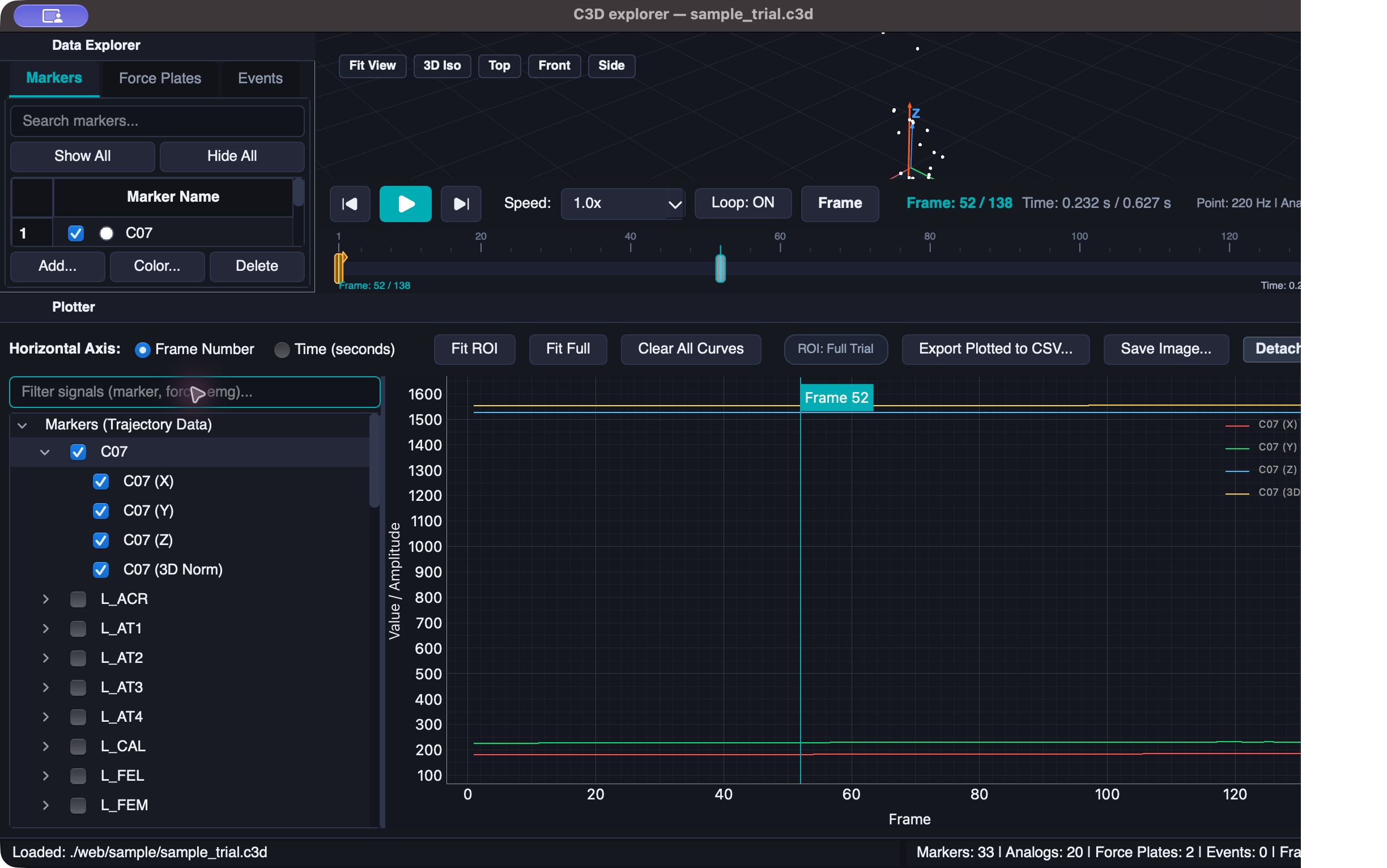
Compare marker components on a shared timeline and relate their curves to the selected frame in the 3D view.
Planned features and future software. These are not included in the current release.
Planned marker trajectory and .mot exports to help move trials into an OpenSim workflow. Export formats are being finalized.
Extend the filtering workflow to force plate signals for additional control over trial preparation.
Deep learning tools for locating and tracking the myotendinous junction (MTJ) in ultrasound images.
Download the experimental macOS build and explore your motion capture data.
Open-source repository link coming soon.
Requires an Apple silicon Mac (M1 or newer), macOS 13 or later. Intel Macs are not supported by this build. Python is bundled.
This experimental build is not notarized by Apple. macOS may block it from opening. Compatibility on other Macs still needs testing.
Dr. Mohamadreza Kharazi is a researcher and biomechanics software developer at Universität Koblenz, Germany. His work specializes in human movement analysis, biomechanical modeling, clinical gait evaluation, and creating high-performance open-source tools for research, sports science, and rehabilitation.